 Lovense Webcam







Collect Now
Lovense Sex Toys
The Leader in
Connected Pleasure
For Her


For Him




For Unisex

For Couples


Camming
Apps
Possibilities
If you have any questions ,click contact us.
Customer Favorites
Browse By Category
Sorry, no content related to - "{0}" - has been found.Help Us Improve!
When browsing our dildo selection, do you see the type(s) you're interested in?

I see dildo machines

I see vibrating dildos

I see thrusting dildos

I see suction cup dildos

I see dual-stimulation/rabbit dildos

I don't see the type I'm looking for!
Help Us Improve!
Please tell us more about the type of dildo you're looking for.
Thank you for your response
Leave your email so we can follow up on your feedback.
We respect your privacy and will only use your info for this survey.
 Cam Model Extension
Cam Extension Guides
Basic Levels Special Commands Keno Game Dice Game Toy Status Vibe with Me Tip Feedback Give ControlInstallation Guides
Extension – Chrome Lovense OBS Toolset Lovense Splitcam Toolset Lovense Cam ExtensionOther Service Guides
Streamate

Cam Model Extension
Written Guides
Cam Extension Guides
Installation Guides
Other Service Guides
Stream Master
Basic Tutorials
Lovense Connect App
 Cam Model Extension
Please note, you need to have OBS Studio (22.0.0 or later) software installed on your computer before installing OBS Toolset. If you already have OBS Studio installed, skip to Step 4 .
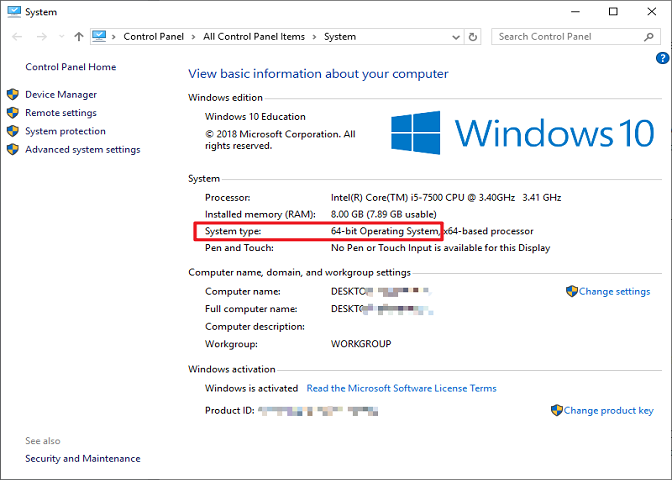
1. Determine if you have a 32-bit or 64-bit operating system. On your keyboard, press and hold the "Windows" key and tap the "Pause" (or "Pause/Break") key.
Check “System type:” to see if it says 32-bit or 64-bit Operating System.
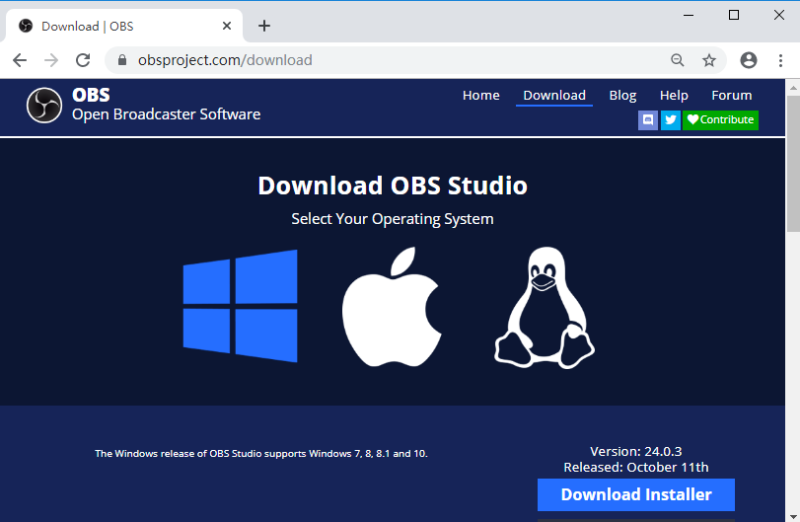
2. Download OBS Studio here. The website will automatically detect which operating system you are running. Click on “Download Installer”.
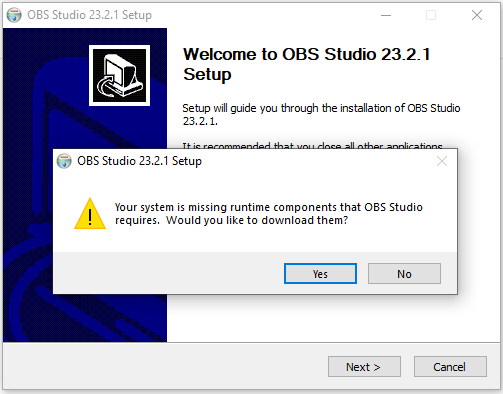
3. Open the downloaded file to install OBS Studio. You may also need Visual C++ if your computer doesn't have it installed. The OBS Studio installer will prompt you and link you to this download if required.
a. If you see this message, click “Yes” and download Visual C++. If you do not see this message, install OBS Studio as usual and skip to Step 4.
b. You will be directed to the download page. Download both files if you are running a 64-bit operating system. Only download the 32-bit installer if you have a 32-bit operating system.
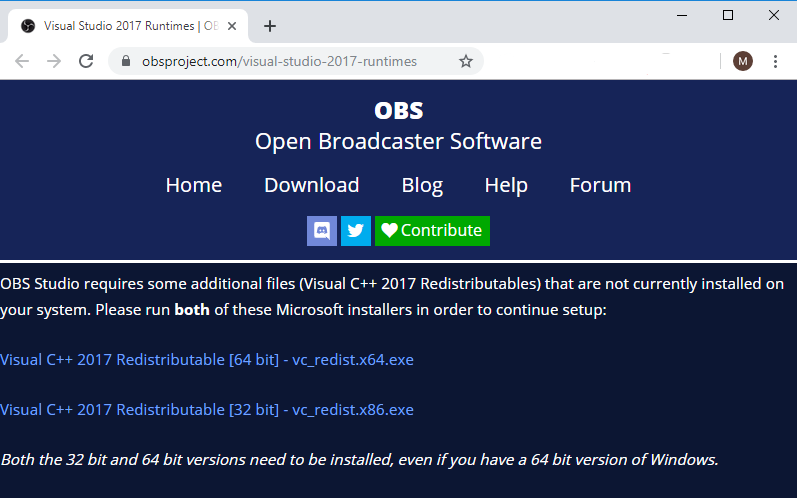
c. Install the Visual C++ file(s) that you just downloaded.
.png)
4. Download the Lovense OBS Toolset which corresponds to your operating system.
5. Install the Lovense OBS Toolset after the download is complete.
.png)
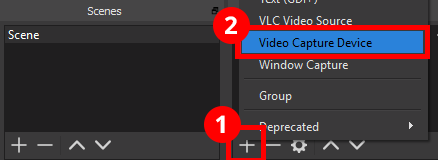
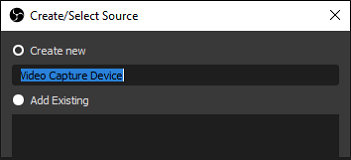
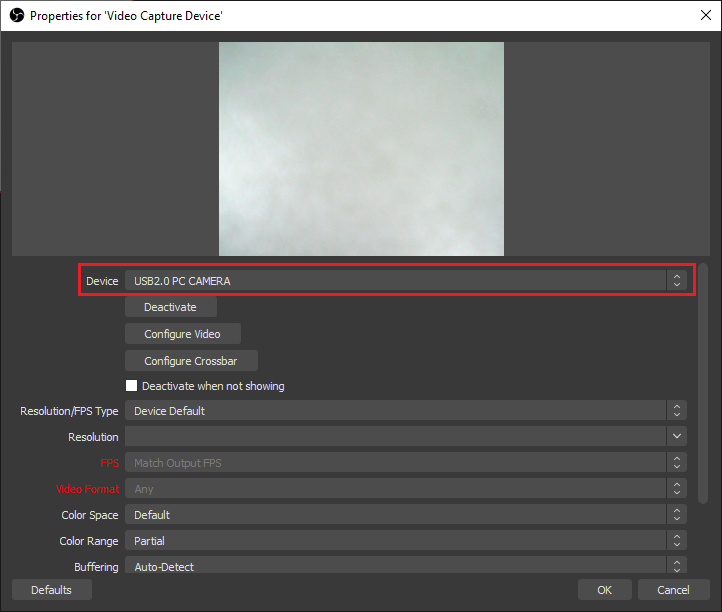
6. Open OBS and add your “Video Capture Device” and “Lovense Video Feedback” into the sources.
Note:
Ensure that the “Lovense Video Feedback” source is listed ABOVE all other sources. If it is not as the top, the video feedback will not display.
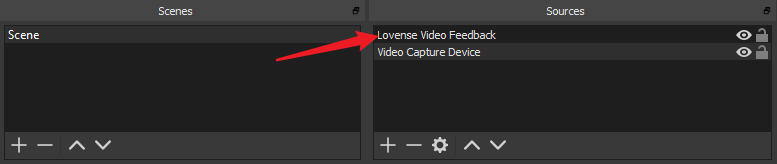
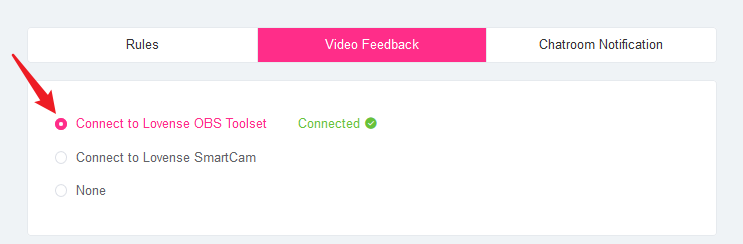
7. Ensure that OBS Studio is open. Go into the Cam Extension settings and click on the “Video Feedback” tab. Then click “Connect to Lovense OBS Toolset”.
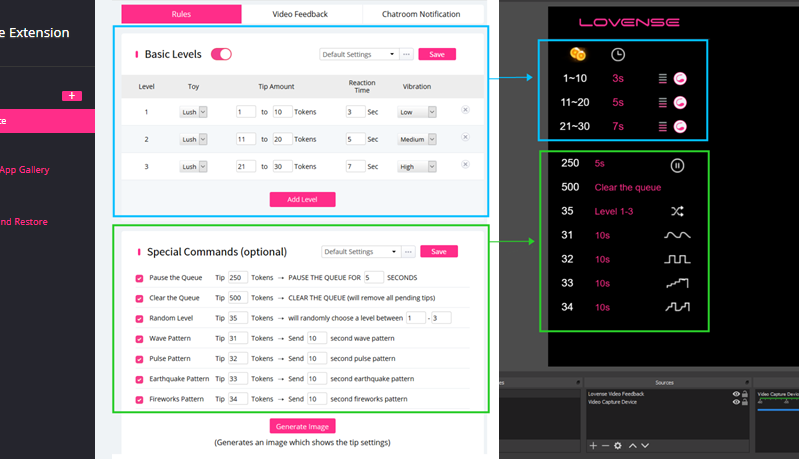
8. After you are connected, you should see the Basic Levels and Special Commands reflected in OBS!
Stay in touch with your pleasure!
Sign up for our newsletter to never miss exclusive deals, new releases, and giveaways. You'll also get instant access to our free Lovense Pleasure Bible.
 Thanks for subscribing!
The email address is not valid. Please try again.
Thanks for subscribing!
The email address is not valid. Please try again.
You can unsubscribe at any time using the link in the newsletter. By clicking on the sign-up button, you agree to our Terms of Use and Privacy Policy.
Age Disclaimer
At LOVENSE, we are dedicated to providing a safe and responsible online environment for adults. We take our responsibility seriously and comply with all relevant regulations and guidelines.
All models featured on our website are 18 years or older. By accessing and using our site, you confirm that you are at least 18 years old and understand and accept the content on our site. If you experience any issues with our site, email our team at [email protected].
For information on the Custodian of Records required, please refer to our U.S.C. §2257 Compliance Notice.

Select Coupon

Not available
OFF
Applies to [toyname] only For orders over [amount] Valid till - [date] For orders over [amount] and new users only Collect Now Use Now Check Coupons Continue Shopping From [coupon activity name] campaign (CST) Expired Shop with Coupon Not available Buy with Coupon Apply Applied Code: Copy CodeCoupons not applicable to Christmas Gift Boxes,Lovense Webcam,Lovense Sex Machine, Lovense Mini Sex Machine,Gush2,Osci 3.
Lucky Buyer Discount

For your order over {0}
Expires in :
Coupons not applicable to Christmas Gift Boxes,Lovense Webcam,Lovense Sex Machine, Lovense Mini Sex Machine,Gush2,Osci 3.
My coupon(s)
Your order can't be automatically tracked because the sign-in email doesn't match.
How to resolve:
1. Visit 'My Orders'
2. Enter your order details manually
Missing your order number?
Contact Us








Freebie
Black Friday
Toys recommended by your friends
Discount
For orders over {0}
Claim Coupon(s)
Check out this toy
Go shopping
Congratulations
Your friend give this coupon to you,hurry up and get your coupons!
Your friend just made an order, you get a coupon!
Sorry, you are late. The current coupon has been claimed by someone else.
Sorry, you are not eligible to receive coupons
Only new users are allowed to receive coupons
Your friend just made an order, you get {0} coupons!
Sorry, please check if your account is correct.
Go check account
You have already received the coupon, go use it now
You have successfully received the coupon, use it now
Please come back in {0} days
The current order does not meet the activity conditions of
"order received"
OK
Congratulations
The mystery prize will be sent out after the order is signed.
OK
Sorry, you didn't win the free order.
Explore more exclusive deals
Once the order is received, we will send your refund.
Once the order is received, we will send your refund.
Your friend has visited the website and you can receive a {0} coupon!
Coupons not applicable to Christmas Gift Boxes,Lovense Webcam,Lovense Sex Machine, Lovense Mini Sex Machine,Gush2,Osci 3.
You Got a {0} Coupon!
Email me a reminder before it expires!
Referral Link Unavailable
This link is expired. Please try another link.
OK
What You May Like
You can unsubscribe at any time using the link in the newsletter. By clicking on the sign-up button, you agree to our Terms of Use and Privacy Policy.
Submit
Enter your email
The Deeper,
The Stronger
60% OFF
New Mission 2
Equipped with depth sensors that intensify vibrations when deeper inserted.
Discover

Email Address
Code
If you encounter any issues, please email our team at [email protected]
We’ve detected a potential security issue with your account. To protect your data, please reset your password now.

You're already on the list! We'll notify you once the Lover Set is back in stock.

Unauthorized Domain
The domain you are currently visiting is NOT an official Lovense website.Please navigate directly to our official site: https://www.lovense.com
Copy Official Link
 Coupons

FREE shipping


We’d love your feedback
Take a quick 5-second survey, thank-you!
Start NowHow did you first hear about Lovense?

Manage Cookies Settings
Cookie is a small file that, when saved on your device, can provide specific functionality support for Lovense websites and online services. On our website, we use the following types of Cookies. For detailed information, please refer to our Lovense Cookie Policy.
Strictly Necessary Cookies
These cookies are necessary to ensuring that our Website and Apps work properly for visitors and registered users, such as maintaining security, authentication, and logging in, and ensuring the ability to securely complete transactions. These cookies cannot be switched off in our systems. You can set your browser to block or alert you about these cookies, but some parts of the site will not then work. These cookies do not store any personally identifiable information.
Functional Cookies
These cookies enable our Website and Apps to provide you with enhanced functionality and personalization. They are used to remember your account and preferences over time, such as keeping yourself logged in when returning, maintaining your choices on how you want the Website to appear (including keeping track of your preferred language and country), and customizing content based on how you use our services. If you do not allow these cookies, then some or all of these services may not function properly.
Performance and Analytics Cookies
These cookies help us understand how visitors interact with our Website and Apps by providing performance data on how our services are functioning, including data on site functionality and speed to help us optimize the Website, how the Website is used to help us improve your experience, and detecting and gathering reporting on bugs. All information these cookies collect is aggregated and therefore anonymous. If you do not allow these cookies, we will not know when you have visited our site and will not be able to monitor its performance.
This order has been cancelled.
We will initiate a refund that should reach you within 7-10 working days.
This order has already been shipped out. You can’t cancel it now. Please contact us for further assistance.
For a better experience, we suggest you upgrade your browser or using other browser.