Lovense Sex Toys
The Leader in
Connected Pleasure
-
For Her
AllLush SeriesG-SpotClitoral & G-SpotDildosAnalNipple Velvo World's First Patented Rolling Bead G-Spot & Clit Rabbit Vibrator
New
Ferri Wearable Magnetic Panty Vibrator
Lush 4 Bluetooth® App-Controlled G-Spot Egg Vibrator
Nora App-Controlled Rabbit Vibrator with Rotating Head
Spinel Portable Thrusting, Vibrating & Heating Dildo
Lush Mini Remote-Controlled Small & Powerful G-Spot Egg Vibrator
Mission 2 Vibrating Suction Cup Dildo with Advanced Touch-Sense Technology
Lush 2 Bluetooth Egg Vibrator
Hyphy Dual-end high frequency vibrator
Ambi Versatile Bullet Vibrator
Lush 3 Bluetooth Egg Vibrator
Tenera 2 App-controlled clitoral suction stimulator
Tenera Bluetooth Clitoral Suction Stimulator
Osci 3 Remote-Controlled, Heating Thumper Rabbit Vibrator for the Clit and G-spot
Gravity Bluetooth Automatic Thrusting & Vibrating Dildo
Lapis App-controlled Dual-ended Vibrating Strapless Strap-on
Flexer Bluetooth Insertable Dual Panty Vibrator
Dolce Adjustable dual vibrator
Vulse App-controlled Vibrating and Thrusting G-spot Egg Vibrator
Exomoon Bluetooth lipstick bullet vibrator
Gemini App-Controlled Vibrating Nipple Clamps
Hush 2 1.5 inch (max diameter) App-Controlled Vibrating Butt Plug
Domi 2 Bluetooth Vibrating Mini Wand
Ridge App-controlled Vibrating and Rotating Anal Beads
Lush Anal Remote Control Small Anal Vibrator for Beginners
Lovense Mini Sex Machine App-Controlled Compact Thrusting Sex Machine
Lovense Sex Machine App-Controlled Thrusting Sex Machine
Velvo World's First Patented Rolling Bead G-Spot & Clit Rabbit Vibrator
Velvo World's First Patented Rolling Bead G-Spot & Clit Rabbit VibratorNew
Lush 4 Bluetooth® App-Controlled G-Spot Egg Vibrator
Nora App-Controlled Rabbit Vibrator with Rotating Head
Spinel Portable Thrusting, Vibrating & Heating Dildo
Lush Mini Remote-Controlled Small & Powerful G-Spot Egg Vibrator
Mission 2 Vibrating Suction Cup Dildo with Advanced Touch-Sense Technology
Lush 2 Bluetooth Egg Vibrator
Hyphy Dual-end high frequency vibrator
Lush 3 Bluetooth Egg Vibrator
Osci 3 Remote-Controlled, Heating Thumper Rabbit Vibrator for the Clit and G-spot
Gravity Bluetooth Automatic Thrusting & Vibrating Dildo
Lapis App-controlled Dual-ended Vibrating Strapless Strap-on
Flexer Bluetooth Insertable Dual Panty Vibrator
Dolce Adjustable dual vibrator
Vulse App-controlled Vibrating and Thrusting G-spot Egg Vibrator
Lovense Mini Sex Machine App-Controlled Compact Thrusting Sex Machine
Lovense Sex Machine App-Controlled Thrusting Sex Machine
Velvo World's First Patented Rolling Bead G-Spot & Clit Rabbit Vibrator
Velvo World's First Patented Rolling Bead G-Spot & Clit Rabbit VibratorNew
Nora App-Controlled Rabbit Vibrator with Rotating Head
Spinel Portable Thrusting, Vibrating & Heating Dildo
Hyphy Dual-end high frequency vibrator
Osci 3 Remote-Controlled, Heating Thumper Rabbit Vibrator for the Clit and G-spot
Lapis App-controlled Dual-ended Vibrating Strapless Strap-on
Flexer Bluetooth Insertable Dual Panty Vibrator
Dolce Adjustable dual vibrator
Velvo World's First Patented Rolling Bead G-Spot & Clit Rabbit Vibrator
Velvo World's First Patented Rolling Bead G-Spot & Clit Rabbit VibratorNew
Nora App-Controlled Rabbit Vibrator with Rotating Head
Spinel Portable Thrusting, Vibrating & Heating Dildo
Mission 2 Vibrating Suction Cup Dildo with Advanced Touch-Sense Technology
Hyphy Dual-end high frequency vibrator
Osci 3 Remote-Controlled, Heating Thumper Rabbit Vibrator for the Clit and G-spot
Lapis App-controlled Dual-ended Vibrating Strapless Strap-on
Gravity Bluetooth Automatic Thrusting & Vibrating Dildo
Lovense Mini Sex Machine App-Controlled Compact Thrusting Sex Machine
Lovense Sex Machine App-Controlled Thrusting Sex Machine
Hush 2 1.5 inch (max diameter) App-Controlled Vibrating Butt Plug
Hush 2 1.5 inch (max diameter) App-Controlled Vibrating Butt Plug
Ridge App-controlled Vibrating and Rotating Anal Beads
Lush Anal Remote Control Small Anal Vibrator for Beginners
Lovense Mini Sex Machine App-Controlled Compact Thrusting Sex Machine
Lovense Sex Machine App-Controlled Thrusting Sex Machine
Velvo World's First Patented Rolling Bead G-Spot & Clit Rabbit Vibrator
Velvo World's First Patented Rolling Bead G-Spot & Clit Rabbit VibratorNew
Ferri Wearable Magnetic Panty Vibrator
Lush 4 Bluetooth® App-Controlled G-Spot Egg Vibrator
Nora App-Controlled Rabbit Vibrator with Rotating Head
Spinel Portable Thrusting, Vibrating & Heating Dildo
Lush Mini Remote-Controlled Small & Powerful G-Spot Egg Vibrator
Mission 2 Vibrating Suction Cup Dildo with Advanced Touch-Sense Technology
Lush 2 Bluetooth Egg Vibrator
Hyphy Dual-end high frequency vibrator
Ambi Versatile Bullet Vibrator
Lush 3 Bluetooth Egg Vibrator
Tenera 2 App-controlled clitoral suction stimulator
Tenera Bluetooth Clitoral Suction Stimulator
Osci 3 Remote-Controlled, Heating Thumper Rabbit Vibrator for the Clit and G-spot
Gravity Bluetooth Automatic Thrusting & Vibrating Dildo
Lapis App-controlled Dual-ended Vibrating Strapless Strap-on
Flexer Bluetooth Insertable Dual Panty Vibrator
Dolce Adjustable dual vibrator
Vulse App-controlled Vibrating and Thrusting G-spot Egg Vibrator
Exomoon Bluetooth lipstick bullet vibrator
Gemini App-Controlled Vibrating Nipple Clamps
Hush 2 1.5 inch (max diameter) App-Controlled Vibrating Butt Plug
Domi 2 Bluetooth Vibrating Mini Wand
Ridge App-controlled Vibrating and Rotating Anal Beads
Lush Anal Remote Control Small Anal Vibrator for Beginners
Lovense Mini Sex Machine App-Controlled Compact Thrusting Sex Machine
Lovense Sex Machine App-Controlled Thrusting Sex Machine
Velvo World's First Patented Rolling Bead G-Spot & Clit Rabbit Vibrator
Velvo World's First Patented Rolling Bead G-Spot & Clit Rabbit VibratorNew
Lush 4 Bluetooth® App-Controlled G-Spot Egg Vibrator
Nora App-Controlled Rabbit Vibrator with Rotating Head
Spinel Portable Thrusting, Vibrating & Heating Dildo
Lush Mini Remote-Controlled Small & Powerful G-Spot Egg Vibrator
Mission 2 Vibrating Suction Cup Dildo with Advanced Touch-Sense Technology
Lush 2 Bluetooth Egg Vibrator
Hyphy Dual-end high frequency vibrator
Lush 3 Bluetooth Egg Vibrator
Osci 3 Remote-Controlled, Heating Thumper Rabbit Vibrator for the Clit and G-spot
Gravity Bluetooth Automatic Thrusting & Vibrating Dildo
Lapis App-controlled Dual-ended Vibrating Strapless Strap-on
Flexer Bluetooth Insertable Dual Panty Vibrator
Dolce Adjustable dual vibrator
Vulse App-controlled Vibrating and Thrusting G-spot Egg Vibrator
Lovense Mini Sex Machine App-Controlled Compact Thrusting Sex Machine
Lovense Sex Machine App-Controlled Thrusting Sex Machine
Velvo World's First Patented Rolling Bead G-Spot & Clit Rabbit Vibrator
Velvo World's First Patented Rolling Bead G-Spot & Clit Rabbit VibratorNew
Nora App-Controlled Rabbit Vibrator with Rotating Head
Spinel Portable Thrusting, Vibrating & Heating Dildo
Hyphy Dual-end high frequency vibrator
Osci 3 Remote-Controlled, Heating Thumper Rabbit Vibrator for the Clit and G-spot
Lapis App-controlled Dual-ended Vibrating Strapless Strap-on
Flexer Bluetooth Insertable Dual Panty Vibrator
Dolce Adjustable dual vibrator
Velvo World's First Patented Rolling Bead G-Spot & Clit Rabbit Vibrator
Velvo World's First Patented Rolling Bead G-Spot & Clit Rabbit VibratorNew
Nora App-Controlled Rabbit Vibrator with Rotating Head
Spinel Portable Thrusting, Vibrating & Heating Dildo
Mission 2 Vibrating Suction Cup Dildo with Advanced Touch-Sense Technology
Hyphy Dual-end high frequency vibrator
Osci 3 Remote-Controlled, Heating Thumper Rabbit Vibrator for the Clit and G-spot
Lapis App-controlled Dual-ended Vibrating Strapless Strap-on
Gravity Bluetooth Automatic Thrusting & Vibrating Dildo
Lovense Mini Sex Machine App-Controlled Compact Thrusting Sex Machine
Lovense Sex Machine App-Controlled Thrusting Sex Machine
Hush 2 1.5 inch (max diameter) App-Controlled Vibrating Butt Plug
Hush 2 1.5 inch (max diameter) App-Controlled Vibrating Butt Plug
Ridge App-controlled Vibrating and Rotating Anal Beads
Lush Anal Remote Control Small Anal Vibrator for Beginners
Lovense Mini Sex Machine App-Controlled Compact Thrusting Sex Machine
Lovense Sex Machine App-Controlled Thrusting Sex Machine -
For Him
AllMasturbatorsPenisProstateAnalNipple
Max 2 High Tech Male Masturbator
Edge 2 Adjustable Prostate Massager
Gush 2 Hands-free, remote-controlled vibrating & oscillating penis massager
Solace Pro AI-Powered Remote Control Thrusting Blowjob Machine
Max 2 High Tech Male Masturbator
Diamo Vibrating Cock Ring
Solace Solace App-controlled automatic thrusting male stroker
Calor Bluetooth pocket pussy
Gemini App-Controlled Vibrating Nipple Clamps
Hush 2 1.5 inch (max diameter) App-Controlled Vibrating Butt Plug
Domi 2 Bluetooth Vibrating Mini Wand
Ridge App-controlled Vibrating and Rotating Anal Beads
Lush Anal Remote Control Small Anal Vibrator for Beginners
Lovense Mini Sex Machine App-Controlled Compact Thrusting Sex Machine
Lovense Sex Machine App-Controlled Thrusting Sex Machine
Max 2 High Tech Male Masturbator
Edge 2 Adjustable Prostate Massager
Gush 2 Hands-free, remote-controlled vibrating & oscillating penis massager
Solace Pro AI-Powered Remote Control Thrusting Blowjob Machine
Max 2 High Tech Male Masturbator
Diamo Vibrating Cock Ring
Solace Solace App-controlled automatic thrusting male stroker
Calor Bluetooth pocket pussy
Kraken Masturbator Soft Stretchy Masturbator
Max 2 High Tech Male Masturbator
Edge 2 Adjustable Prostate Massager
Gush 2 Hands-free, remote-controlled vibrating & oscillating penis massager
Solace Pro AI-Powered Remote Control Thrusting Blowjob Machine
Max 2 High Tech Male Masturbator
Diamo Vibrating Cock Ring
Solace Solace App-controlled automatic thrusting male stroker
Calor Bluetooth pocket pussy
Kraken Masturbator Soft Stretchy Masturbator
Hush 2 1.5 inch (max diameter) App-Controlled Vibrating Butt Plug
Edge 2 Adjustable Prostate Massager
Hush 2 1.5 inch (max diameter) App-Controlled Vibrating Butt Plug
Ridge App-controlled Vibrating and Rotating Anal Beads
Lush Anal Remote Control Small Anal Vibrator for Beginners
Lovense Mini Sex Machine App-Controlled Compact Thrusting Sex Machine
Lovense Sex Machine App-Controlled Thrusting Sex Machine -
For Unisex
AllAnalNipple
Hush 2 1.5 inch (max diameter) App-Controlled Vibrating Butt Plug
Gemini App-Controlled Vibrating Nipple Clamps
Hush 2 1.5 inch (max diameter) App-Controlled Vibrating Butt Plug
Domi 2 Bluetooth Vibrating Mini Wand
Ridge App-controlled Vibrating and Rotating Anal Beads
Lush Anal Remote Control Small Anal Vibrator for Beginners
Lovense Mini Sex Machine App-Controlled Compact Thrusting Sex Machine
Lovense Sex Machine App-Controlled Thrusting Sex Machine
Hush 2 1.5 inch (max diameter) App-Controlled Vibrating Butt Plug
Hush 2 1.5 inch (max diameter) App-Controlled Vibrating Butt Plug
Ridge App-controlled Vibrating and Rotating Anal Beads
Lush Anal Remote Control Small Anal Vibrator for Beginners
Lovense Mini Sex Machine App-Controlled Compact Thrusting Sex Machine
Lovense Sex Machine App-Controlled Thrusting Sex Machine -
For Couples
AllCouples Sets & BundlesLong-Distance PlayApp & Remote Controlled Toys
Velvo World's First Patented Rolling Bead G-Spot & Clit Rabbit Vibrator
Velvo World's First Patented Rolling Bead G-Spot & Clit Rabbit VibratorNew
Edge 2 Adjustable Prostate Massager
Gush 2 Hands-free, remote-controlled vibrating & oscillating penis massager
Solace Pro AI-Powered Remote Control Thrusting Blowjob Machine
Max 2 High Tech Male Masturbator
Gemini App-Controlled Vibrating Nipple Clamps
Hush 2 1.5 inch (max diameter) App-Controlled Vibrating Butt Plug
Ferri Wearable Magnetic Panty Vibrator
Diamo Vibrating Cock Ring
Domi 2 Bluetooth Vibrating Mini Wand
Lush 4 Bluetooth® App-Controlled G-Spot Egg Vibrator
Ridge App-controlled Vibrating and Rotating Anal Beads
Solace Solace App-controlled automatic thrusting male stroker
Nora App-Controlled Rabbit Vibrator with Rotating Head
Spinel Portable Thrusting, Vibrating & Heating Dildo
Lush Mini Remote-Controlled Small & Powerful G-Spot Egg Vibrator
Mission 2 Vibrating Suction Cup Dildo with Advanced Touch-Sense Technology
Lush 2 Bluetooth Egg Vibrator
Hyphy Dual-end high frequency vibrator
Ambi Versatile Bullet Vibrator
Lush 3 Bluetooth Egg Vibrator
Tenera 2 App-controlled clitoral suction stimulator
Tenera Bluetooth Clitoral Suction Stimulator
Osci 3 Remote-Controlled, Heating Thumper Rabbit Vibrator for the Clit and G-spot
Gravity Bluetooth Automatic Thrusting & Vibrating Dildo
Lapis App-controlled Dual-ended Vibrating Strapless Strap-on
Flexer Bluetooth Insertable Dual Panty Vibrator
Dolce Adjustable dual vibrator
Vulse App-controlled Vibrating and Thrusting G-spot Egg Vibrator
Exomoon Bluetooth lipstick bullet vibrator
Calor Bluetooth pocket pussy
Lush Anal Remote Control Small Anal Vibrator for Beginners
Lovense Mini Sex Machine App-Controlled Compact Thrusting Sex Machine
Lovense Sex Machine App-Controlled Thrusting Sex Machine
Gush 2 and Edge 2 Penis & prostate massager set
Max 2 and Edge 2 Penis and Prostate Toys
Lush 4 and Ferri Wearable G-spot & Clitoris Vibrator Set
Lush 4 and Gemini G-Spot & Nipple Vibrator Set
Lush 4 and Domi 2 G-Spot, Clit, and/or Nipple Vibrator Set
Lush 4 and Nora Interactive vibrator set for G-spot and clit
Lush 4 and Hush 2 (1.5 inch) Wearable G-spot and butt plug vibrator set
Lush Mini and Ferri Wearable G-spot & Clitoris Vibrator Set
Nora and Max 2 Long-Distance Relationship Sex Toys
Gush 2 and Diamo Penis massager + cock ring set
Lush 4 and Gush 2 G-spot vibrator + Penis massager set
Solace Pro and Edge 2 Immersive Hands-free Play Set
Solace Pro and Mission 2 Long Distance Relationship Real-time Sync Couples Toys
Lapis and Lovense Harness Extend the play, improve the pleasure
Lush 4 and Ferri Wearable G-spot & Clitoris Vibrator Set
Gush 2 and Edge 2 Penis & prostate massager set
Max 2 and Edge 2 Penis and Prostate Toys
Lush 4 and Ferri Wearable G-spot & Clitoris Vibrator Set
Lush 4 and Gemini G-Spot & Nipple Vibrator Set
Lush 4 and Domi 2 G-Spot, Clit, and/or Nipple Vibrator Set
Lush 4 and Nora Interactive vibrator set for G-spot and clit
Lush 4 and Hush 2 (1.5 inch) Wearable G-spot and butt plug vibrator set
Lush Mini and Ferri Wearable G-spot & Clitoris Vibrator Set
Nora and Max 2 Long-Distance Relationship Sex Toys
Gush 2 and Diamo Penis massager + cock ring set
Lush 4 and Gush 2 G-spot vibrator + Penis massager set
Solace Pro and Edge 2 Immersive Hands-free Play Set
Solace Pro and Mission 2 Long Distance Relationship Real-time Sync Couples Toys
Lapis and Lovense Harness Extend the play, improve the pleasure
Velvo World's First Patented Rolling Bead G-Spot & Clit Rabbit Vibrator
Velvo World's First Patented Rolling Bead G-Spot & Clit Rabbit VibratorNew
Edge 2 Adjustable Prostate Massager
Gush 2 Hands-free, remote-controlled vibrating & oscillating penis massager
Solace Pro AI-Powered Remote Control Thrusting Blowjob Machine
Max 2 High Tech Male Masturbator
Gemini App-Controlled Vibrating Nipple Clamps
Hush 2 1.5 inch (max diameter) App-Controlled Vibrating Butt Plug
Ferri Wearable Magnetic Panty Vibrator
Diamo Vibrating Cock Ring
Domi 2 Bluetooth Vibrating Mini Wand
Lush 4 Bluetooth® App-Controlled G-Spot Egg Vibrator
Ridge App-controlled Vibrating and Rotating Anal Beads
Solace Solace App-controlled automatic thrusting male stroker
Nora App-Controlled Rabbit Vibrator with Rotating Head
Spinel Portable Thrusting, Vibrating & Heating Dildo
Lush Mini Remote-Controlled Small & Powerful G-Spot Egg Vibrator
Mission 2 Vibrating Suction Cup Dildo with Advanced Touch-Sense Technology
Lush 2 Bluetooth Egg Vibrator
Hyphy Dual-end high frequency vibrator
Ambi Versatile Bullet Vibrator
Lush 3 Bluetooth Egg Vibrator
Tenera 2 App-controlled clitoral suction stimulator
Tenera Bluetooth Clitoral Suction Stimulator
Osci 3 Remote-Controlled, Heating Thumper Rabbit Vibrator for the Clit and G-spot
Gravity Bluetooth Automatic Thrusting & Vibrating Dildo
Lapis App-controlled Dual-ended Vibrating Strapless Strap-on
Flexer Bluetooth Insertable Dual Panty Vibrator
Dolce Adjustable dual vibrator
Vulse App-controlled Vibrating and Thrusting G-spot Egg Vibrator
Exomoon Bluetooth lipstick bullet vibrator
Calor Bluetooth pocket pussy
Lush Anal Remote Control Small Anal Vibrator for Beginners
Lovense Mini Sex Machine App-Controlled Compact Thrusting Sex Machine
Lovense Sex Machine App-Controlled Thrusting Sex Machine
Gush 2 and Edge 2 Penis & prostate massager set
Max 2 and Edge 2 Penis and Prostate Toys
Lush 4 and Ferri Wearable G-spot & Clitoris Vibrator Set
Lush 4 and Gemini G-Spot & Nipple Vibrator Set
Lush 4 and Domi 2 G-Spot, Clit, and/or Nipple Vibrator Set
Lush 4 and Nora Interactive vibrator set for G-spot and clit
Lush 4 and Hush 2 (1.5 inch) Wearable G-spot and butt plug vibrator set
Lush Mini and Ferri Wearable G-spot & Clitoris Vibrator Set
Nora and Max 2 Long-Distance Relationship Sex Toys
Gush 2 and Diamo Penis massager + cock ring set
Lush 4 and Gush 2 G-spot vibrator + Penis massager set
Solace Pro and Edge 2 Immersive Hands-free Play Set
Solace Pro and Mission 2 Long Distance Relationship Real-time Sync Couples Toys
Lapis and Lovense Harness Extend the play, improve the pleasure
Velvo World's First Patented Rolling Bead G-Spot & Clit Rabbit Vibrator
Velvo World's First Patented Rolling Bead G-Spot & Clit Rabbit VibratorNew
Edge 2 Adjustable Prostate Massager
Gush 2 Hands-free, remote-controlled vibrating & oscillating penis massager
Solace Pro AI-Powered Remote Control Thrusting Blowjob Machine
Max 2 High Tech Male Masturbator
Gemini App-Controlled Vibrating Nipple Clamps
Hush 2 1.5 inch (max diameter) App-Controlled Vibrating Butt Plug
Ferri Wearable Magnetic Panty Vibrator
Diamo Vibrating Cock Ring
Domi 2 Bluetooth Vibrating Mini Wand
Lush 4 Bluetooth® App-Controlled G-Spot Egg Vibrator
Ridge App-controlled Vibrating and Rotating Anal Beads
Solace Solace App-controlled automatic thrusting male stroker
Nora App-Controlled Rabbit Vibrator with Rotating Head
Spinel Portable Thrusting, Vibrating & Heating Dildo
Lush Mini Remote-Controlled Small & Powerful G-Spot Egg Vibrator
Mission 2 Vibrating Suction Cup Dildo with Advanced Touch-Sense Technology
Lush 2 Bluetooth Egg Vibrator
Hyphy Dual-end high frequency vibrator
Ambi Versatile Bullet Vibrator
Lush 3 Bluetooth Egg Vibrator
Tenera 2 App-controlled clitoral suction stimulator
Tenera Bluetooth Clitoral Suction Stimulator
Osci 3 Remote-Controlled, Heating Thumper Rabbit Vibrator for the Clit and G-spot
Gravity Bluetooth Automatic Thrusting & Vibrating Dildo
Lapis App-controlled Dual-ended Vibrating Strapless Strap-on
Flexer Bluetooth Insertable Dual Panty Vibrator
Dolce Adjustable dual vibrator
Vulse App-controlled Vibrating and Thrusting G-spot Egg Vibrator
Exomoon Bluetooth lipstick bullet vibrator
Calor Bluetooth pocket pussy
Lush Anal Remote Control Small Anal Vibrator for Beginners
Lovense Mini Sex Machine App-Controlled Compact Thrusting Sex Machine
Lovense Sex Machine App-Controlled Thrusting Sex Machine
Gush 2 and Edge 2 Penis & prostate massager set
Max 2 and Edge 2 Penis and Prostate Toys
Lush 4 and Ferri Wearable G-spot & Clitoris Vibrator Set
Lush 4 and Gemini G-Spot & Nipple Vibrator Set
Lush 4 and Domi 2 G-Spot, Clit, and/or Nipple Vibrator Set
Lush 4 and Nora Interactive vibrator set for G-spot and clit
Lush 4 and Hush 2 (1.5 inch) Wearable G-spot and butt plug vibrator set
Lush Mini and Ferri Wearable G-spot & Clitoris Vibrator Set
Nora and Max 2 Long-Distance Relationship Sex Toys
Gush 2 and Diamo Penis massager + cock ring set
Lush 4 and Gush 2 G-spot vibrator + Penis massager set
Solace Pro and Edge 2 Immersive Hands-free Play Set
Solace Pro and Mission 2 Long Distance Relationship Real-time Sync Couples Toys
Lapis and Lovense Harness Extend the play, improve the pleasure




-
Camming
Introduction Lovense is here to help you monetize your cam shows by providing the toys and services needed to maximize profit. Cam101 Unlock your potential as a cam model with our empowering community, written guides, and video courses. Download One-stop streaming tool for cam models. Download and start live streaming now. Lovense 4K Webcam 2New The AI 4K webcam for live streaming, Live streaming made easy. Setup Guides Resolve all questions about the Model, including text and video instructions. -
Apps
-
Possibilities
Interactive ExperiencesConnection & ControlShop by AudienceGuides & Play IdeasTools, Gifts & Bundles - Community
Products
FAQ
Discover
Submit successful
Buy Now
If you have any questions ,click contact us.
Customer Favorites
Browse By Category
Sorry, no content related to - "{0}" - has been found.
Please confirm your size preference below:
Choose a size:
XS
1 in
S
1.5 in
M
1.75 in
L
2.25 in
Continue
Hush 2 (1.5 inch)
Hush 2 (1 inch)
Hush 2 (1.75 inch)
Hush 2 (2.25 inch)
Price for 2 items
Added to cart successfully.
Shop Now
Freebie
Free Toy
Free
Help Us Improve!
When browsing our dildo selection, do you see the type(s) you're interested in?

I see dildo machines

I see vibrating dildos

I see thrusting dildos

I see suction cup dildos

I see dual-stimulation/rabbit dildos

I don't see the type I'm looking for!
Next
Help Us Improve!
Please tell us more about the type of dildo you're looking for.
0/500
Next
Thank you for your response
Leave your email so we can follow up on your feedback.
We respect your privacy and will only use your info for this survey.
Submit
Thank you for your feedback.
 Cam Model Extension
Cam Extension Guides
Basic Levels Special Commands Keno Game Dice Game Toy Status Vibe with Me Tip Feedback Give ControlInstallation Guides
Extension – Chrome Lovense OBS Toolset Lovense Splitcam Toolset Lovense Cam ExtensionOther Service Guides
Streamate

User Guides
Cam Model Extension
Written Guides
-
Cam Extension Guides
-
Installation Guides
-
Other Service Guides
Stream Master
-
Basic Tutorials
Lovense Connect App
 Lovense Webcam
 Cam Model Extension
Tutorial For Lovense Widget On Your Broadcasting Page
When you log in to your cam site and open your broadcasting page, the Lovense widget panel will show up on the right side of your screen. The Lovense widget panel has many useful functions to help you manage your stream while broadcasting live.
Click on the "Fold" icon at the top right of the widget panel, it will fold into a little icon. Click on the icon when you need to access the panel and it will show up again.
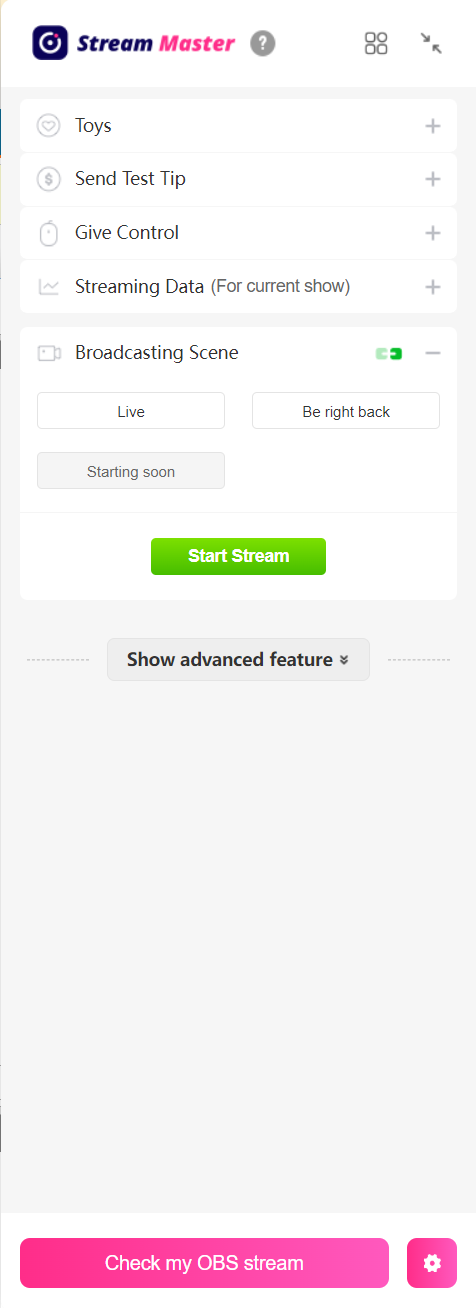
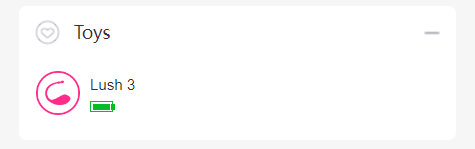
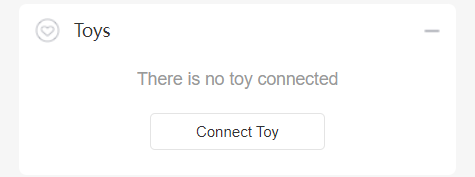
Select "Toys" to unfold it. You can find your toy's status and see if it is connected correctly.
If your toy failed to connect, you'll be informed as shown below.
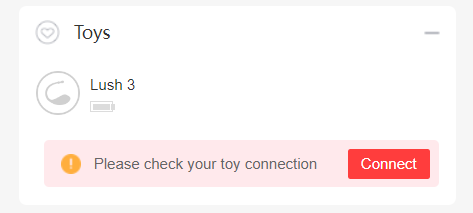
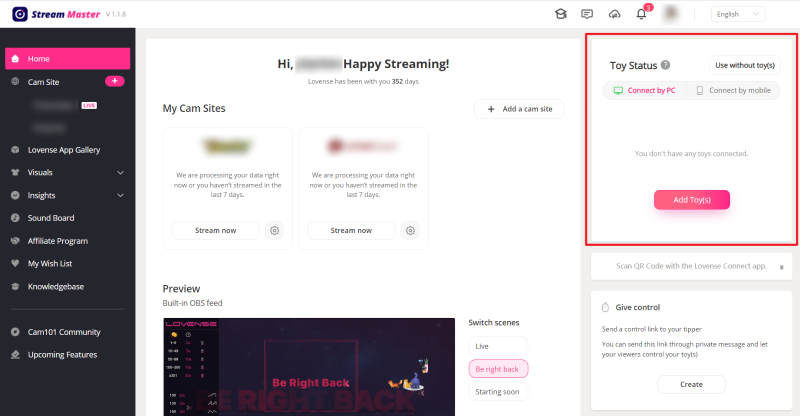
If you haven't connected any toys, click on the "Connect Toy" button to connect.
You will be directed to the settings page.
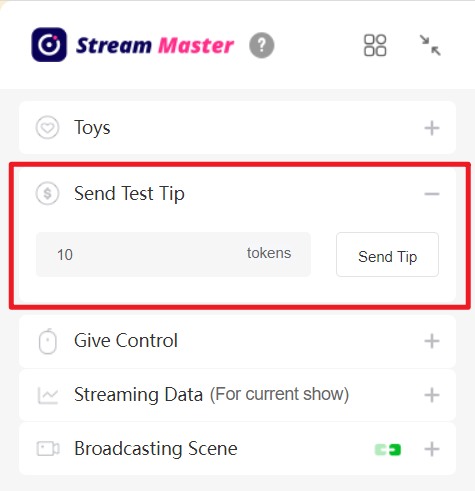
Select "Send Test Tip" to unfold it. You can send a test tip by clicking on the "Send Tip" button. Your toy will vibrate in response to the test tip according to your tip rules.
Select "Give Control" to create a Control Link to send to your viewer(s) to let them control your toy. Click on the "Create" button to open the panel.
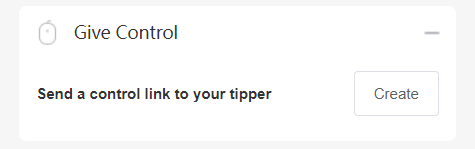
If you haven't connected your toy, you'll be prompted to connect it.
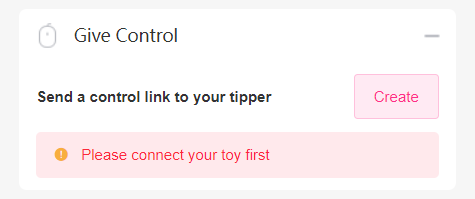
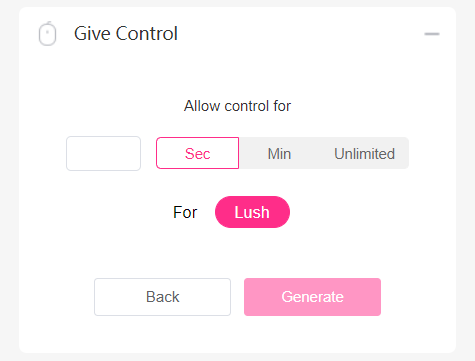
Set the time limit on the panel first, then click on the "Generate" button to generate a Control Link.
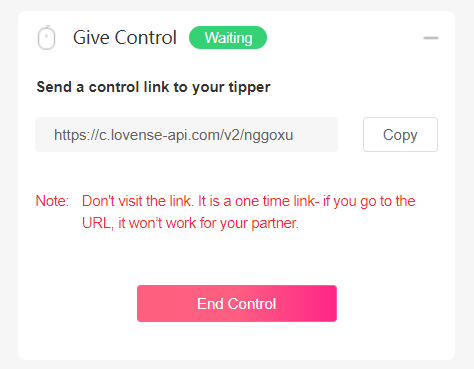
Copy and send it to your tipper. Do not visit the link yourself. When your tipper opens the link, they can control your toy. You can end the control session at any time.
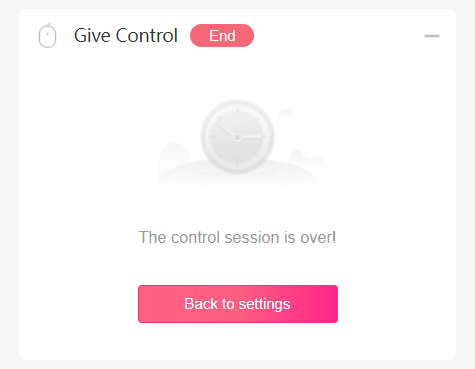
When the control session is over, click on "Back to settings" to create another Control Link.
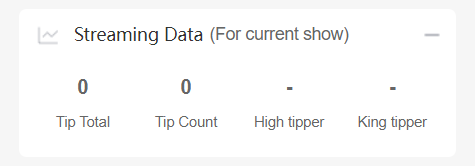
Select "Streaming Data" to see how much you earned during the current session.
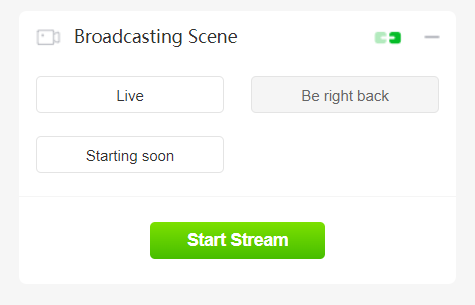
Select "Broadcasting Scene" to choose a scene from the built-in scenes. You can preview it by clicking on the "Check my OBS stream" button at the bottom of the widget panel.
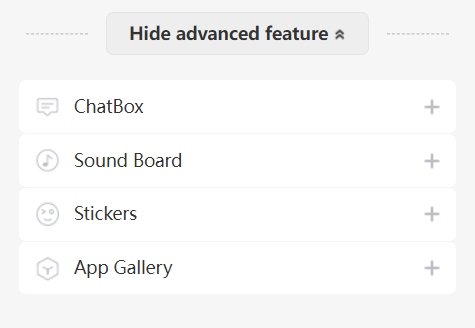
Click on "Show advanced features" to see the advanced features.
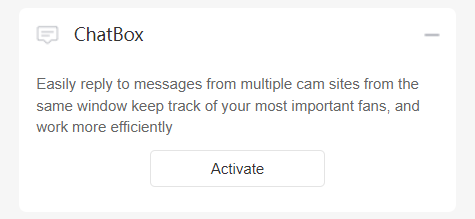
ChatBox can gather the important messages from all your cam sites, and helps set you free from annoying notifications. If you are multi-streaming, just activate ChatBox to check all your chats without switching pages. You can chat with your viewers, check how much they tip you and take notes on each of them.
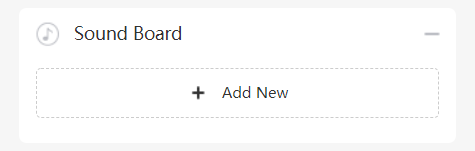
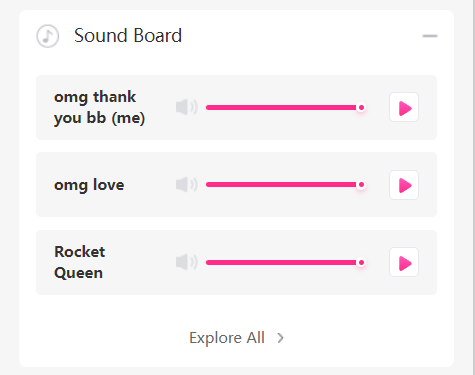
Select "Sound Board" to play music or any sound to add another level of customization to your stream. Click on the "Add New" button to open the settings panel. You can add audio clips to the playlist in the widget panel.
Select "Stickers" to decorate your stream. Click on the "Add New" button to open the settings panel. If you've added Animated Text, Countdown, or Leaderboard stickers, you can manage them in the widget panel.

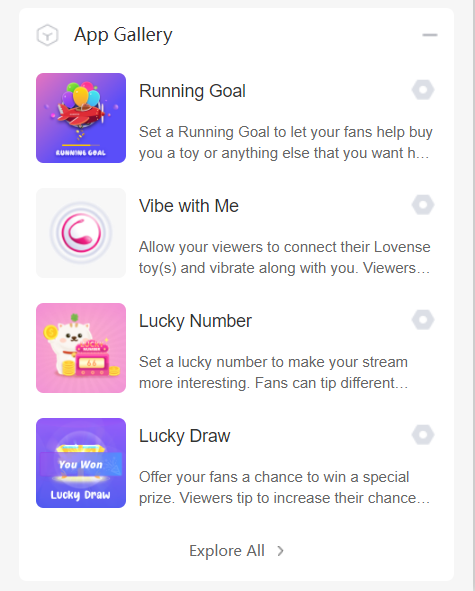
Select "App Gallery" to browse apps to make your stream more interactive and earn more tips. Choose one from the list and click on its "Settings" button to customize your rules.
Now you've learned how to use the Lovense widget panel on your broadcasting page. Happy streaming!
- Support
- FAQ
- User Guides
- Download
- Contact Us
- Warranty
- Shipping FAQ
- Payment FAQ
- Press Room
- Declaration of Conformity
Stay in touch with your pleasure!
Sign up for our newsletter to never miss exclusive deals, new releases, and giveaways. You'll also get instant access to our free Lovense Pleasure Bible.
 Thanks for subscribing!
The email address is not valid. Please try again.
Thanks for subscribing!
The email address is not valid. Please try again.
You can unsubscribe at any time using the link in the newsletter. By clicking on the sign-up button, you agree to our Terms of Use and Privacy Policy.
Copyright © 2009 - @year by HYTTO PTE. LTD.
Privacy Policy
·
T&C
·
EULA
·
Cookie Policy
·
Security
·
Accessibility Statement
·
2257
Age Disclaimer
At LOVENSE, we are dedicated to providing a safe and responsible online environment for adults. We take our responsibility seriously and comply with all relevant regulations and guidelines.
All models featured on our website are 18 years or older. By accessing and using our site, you confirm that you are at least 18 years old and understand and accept the content on our site. If you experience any issues with our site, email our team at [email protected].
For information on the Custodian of Records required, please refer to our U.S.C. §2257 Compliance Notice.
The email address is not valid. Please try again.
Please enter your email address.
Use Now
Check Coupons

Select Coupon
Coupon
Extra Discount

Not available
Total discount
OK
[amount]
OFF
Applies to [toyname] only For orders over [amount] Valid till - [date] For orders over [amount] and new users only Collect Now Use Now Check Coupons Continue Shopping From [coupon activity name] campaign (CST) Expired Shop with Coupon Not available Buy with Coupon Apply Applied Code: Copy Code
Mon.
Tues.
Wed.
Thur.
Fri.
Sat.
Sun.
Jan
Feb
Mar
Apr
May
Jun
Jul
Aug
Sep
Oct
Nov
Dec
Date of Birth
Cancel
Confirm
Month
Day
Continue shopping
Use
CONGRATULATIONS!
For compliance, please share your birthdate to receive our SMS updates.
en
Save
Coupons not applicable to Christmas Gift Boxes,Lovense Webcam,Lovense Sex Machine, Lovense Mini Sex Machine,Gush2,Osci 3.
Lucky Buyer Discount

{0} OFF
For your order over {0}
Expires in :
*Applies to any Lovense toy excluding single products with a discount over 50%.
Subscribe and receive your exclusive total of $15 discount!
OFF
More
Less
Subscription content preferences
Email frequency preferences
Enter your email
Confirm
{0} coupon received.
Start shopping now! You've already subscribed to our newsletter. Use Now Check Coupons Continue Shopping Subscribe discount Used The email address is not valid. Please try again. Collect Now Collected Your {0} discount will expire in 29:59 Expires in: Hold on! We want to give YOU discount for your order today Valid for: 30 min Collect Now CONGRATULATIONS! Expires in : You won Use Now For your order over {0} {0} OFF Collect Applies to any Lovense toy excluding single products with a discount over 50%. For your order over {0}
Start shopping now! You've already subscribed to our newsletter. Use Now Check Coupons Continue Shopping Subscribe discount Used The email address is not valid. Please try again. Collect Now Collected Your {0} discount will expire in 29:59 Expires in: Hold on! We want to give YOU discount for your order today Valid for: 30 min Collect Now CONGRATULATIONS! Expires in : You won Use Now For your order over {0} {0} OFF Collect Applies to any Lovense toy excluding single products with a discount over 50%. For your order over {0}
Mon.
Tues.
Wed.
Thur.
Fri.
Sat.
Sun.
Jan
Feb
Mar
Apr
May
Jun
Jul
Aug
Sep
Oct
Nov
Dec
Date of Birth
Cancel
Confirm
Month
Day
Continue shopping
Use
CONGRATULATIONS!
For compliance, please share your birthdate to receive our SMS updates.
en
Save
Coupons not applicable to Christmas Gift Boxes,Lovense Webcam,Lovense Sex Machine, Lovense Mini Sex Machine,Gush2,Osci 3.
My coupon(s)
Subscribe and receive your exclusive total of $15 discount!
OFF
More
Less
Subscription content preferences
Email frequency preferences
Enter your email
Confirm
{0} coupon received.
Start shopping now! You've already subscribed to our newsletter. Use Now Check Coupons Continue Shopping Subscribe discount Used The email address is not valid. Please try again. Collect Now Collected Your {0} discount will expire in 29:59 Expires in: Hold on! We want to give YOU discount for your order today Valid for: 30 min Collect Now CONGRATULATIONS! Expires in : You won Use Now For your order over {0} {0} OFF Collect Applies to any Lovense toy excluding single products with a discount over 50%. For your order over {0} For orders over {0} Expiration Date: Coupon Rules Applies to any Lovense toy excluding Lovense Webcam2, Lovense Sex Machine, Lovense Mini Sex Machine. Applies to any Lovense toy excluding single products with a discount over 50%. Cannot be used with other Lovense discounts. Use it Copy Code Code: Copied successfully! copy failed
Start shopping now! You've already subscribed to our newsletter. Use Now Check Coupons Continue Shopping Subscribe discount Used The email address is not valid. Please try again. Collect Now Collected Your {0} discount will expire in 29:59 Expires in: Hold on! We want to give YOU discount for your order today Valid for: 30 min Collect Now CONGRATULATIONS! Expires in : You won Use Now For your order over {0} {0} OFF Collect Applies to any Lovense toy excluding single products with a discount over 50%. For your order over {0} For orders over {0} Expiration Date: Coupon Rules Applies to any Lovense toy excluding Lovense Webcam2, Lovense Sex Machine, Lovense Mini Sex Machine. Applies to any Lovense toy excluding single products with a discount over 50%. Cannot be used with other Lovense discounts. Use it Copy Code Code: Copied successfully! copy failed
CONGRATULATIONS!
{0} OFF
For your order over {0}
Expires in 3 days
Use
Recommended Toys
Claim & Shop Now!
You won {0} coupons
You've Obtained {0} Amazing Coupon(s)!
Expires in {0} days
*Best discounts auto-selected at checkout.
Expires {0}
Your order can't be automatically tracked because the sign-in email doesn't match.
How to resolve:
1. Visit 'My Orders'
2. Enter your order details manually
Missing your order number?
Contact Us







Use Now
More
FOR YOUR ORDER
Lovense Solace Pro is coming soon! Reserve now for 53% off, a $10 coupon, and a free bottle of lube! Let's enjoy AI sync auto-thrusting together!
Copy successful
For orders over {0}
Valid now, use for other Lovense toys
Confirm
OK
Buy Now
My Coupons
Used
Thanks for subscribing!
Read the Lovense Pleasure Bible now. A copy has also been sent to your email address.
OK









Cancel
Answer 3 questions to reveal your fortune
Self
Scenario
Challenge
Reveal My Reading
Your 2025 Reading
Share
Buy Now
Thanks for subscribing!
The email address is not valid. Please try again.
Freebie
Black Friday
Toys recommended by your friends
Discount
For orders over {0}
Claim Coupon(s)
Check out this toy
Go shopping
Congratulations
Your friend give this coupon to you,hurry up and get your coupons!
Your friend just made an order, you get a coupon!
Sorry, you are late. The current coupon has been claimed by someone else.
Sorry, you are not eligible to receive coupons
Only new users are allowed to receive coupons
Your friend just made an order, you get {0} coupons!
Sorry, please check if your account is correct.
Go check account
You have already received the coupon, go use it now
You have successfully received the coupon, use it now
Please come back in {0} days
The current order does not meet the activity conditions of
"order received"
OK
Congratulations
The mystery prize will be sent out after the order is signed.
OK
Sorry, you didn't win the free order.
Explore more exclusive deals
Once the order is received, we will send your refund.
Once the order is received, we will send your refund.
Your friend has visited the website and you can receive a {0} coupon!
Coupons not applicable to Christmas Gift Boxes,Lovense Webcam,Lovense Sex Machine, Lovense Mini Sex Machine,Gush2,Osci 3.
You Got a {0} Coupon!
Email me a reminder before it expires!
Referral Link Unavailable
This link is expired. Please try another link.
OK
What You May Like
You can unsubscribe at any time using the link in the newsletter. By clicking on the sign-up button, you agree to our Terms of Use and Privacy Policy.
Submit
Enter your email
The Deeper,
The Stronger
60% OFF
New Mission 2
Equipped with depth sensors that intensify vibrations when deeper inserted.
Discover
Buy Now
Find Your Perfect Lush
Recommended
Learn More
Back

For security purposes, please verify your account via email.
Email Address
Send
Code
If you encounter any issues, please email our team at [email protected]
Cancel
Confirm
Account Verification Required
We’ve detected a potential security issue with your account. To protect your data, please reset your password now.
Remind Me Later
Reset Password Now
Sent successfully, please pay attention to the email

We’re Restocking Soon!
The Lover Set is currently out of stock. Enter your email below, and we’ll notify you the moment it’s back.
Enter your email
Please enter a valid email address.
Thanks! We've received your email!
You're already on the list! We'll notify you once the Lover Set is back in stock.

Unauthorized Domain
The domain you are currently visiting is NOT an official Lovense website.Please navigate directly to our official site: https://www.lovense.com
Copy Official LinkFeedback

Coupons
Coupon
 Coupons
Collect Now

FREE shipping
00:00:00


Buy now with {0} off
Buy now
with {0} off Coupon
with {0} off Coupon
We’d love your feedback
Take a quick 5-second survey, thank-you!
Start NowHow did you first hear about Lovense?
From a friend or family member
Search engine (Google, Bing, etc.)
Camming site or livestream
Social media (Instagram, TikTok, Facebook, etc.)
Adult content site
Local store or offline event
Gaming platform or in-game
AI chatbot or virtual companion
News article or review
Received as a gift
Other
Please tell us your answer in the box.
Please select an option first.
Submitted Successfully!
New Year Coupons
Go to Store